What Is SQL?
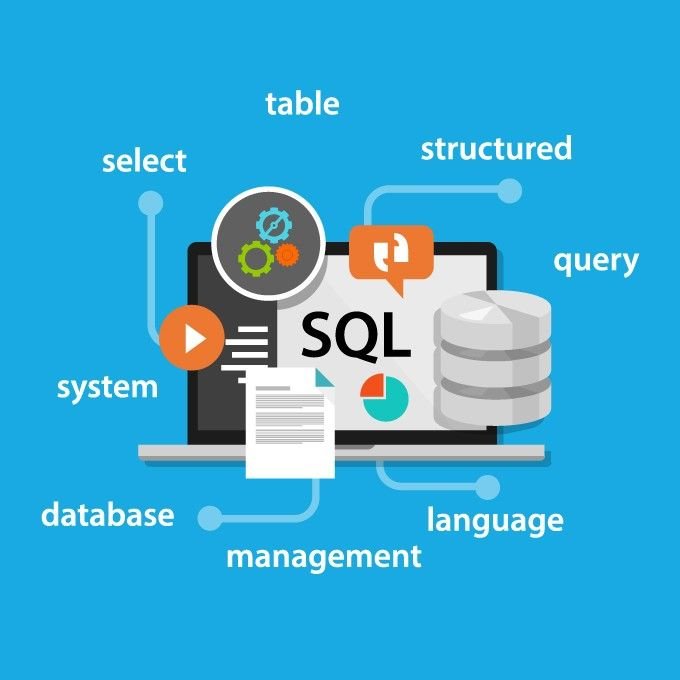
SQL (Structured Query Language) is the standard language used to manage and manipulate relational databases.
It allows users to:
- Retrieve data
- Insert records
- Update information
- Delete data
- Manage database structures
Because SQL works with structured data stored in tables, it is widely used in data analysis, backend development, and enterprise systems.
How an SQL Query Works (Step-by-Step)
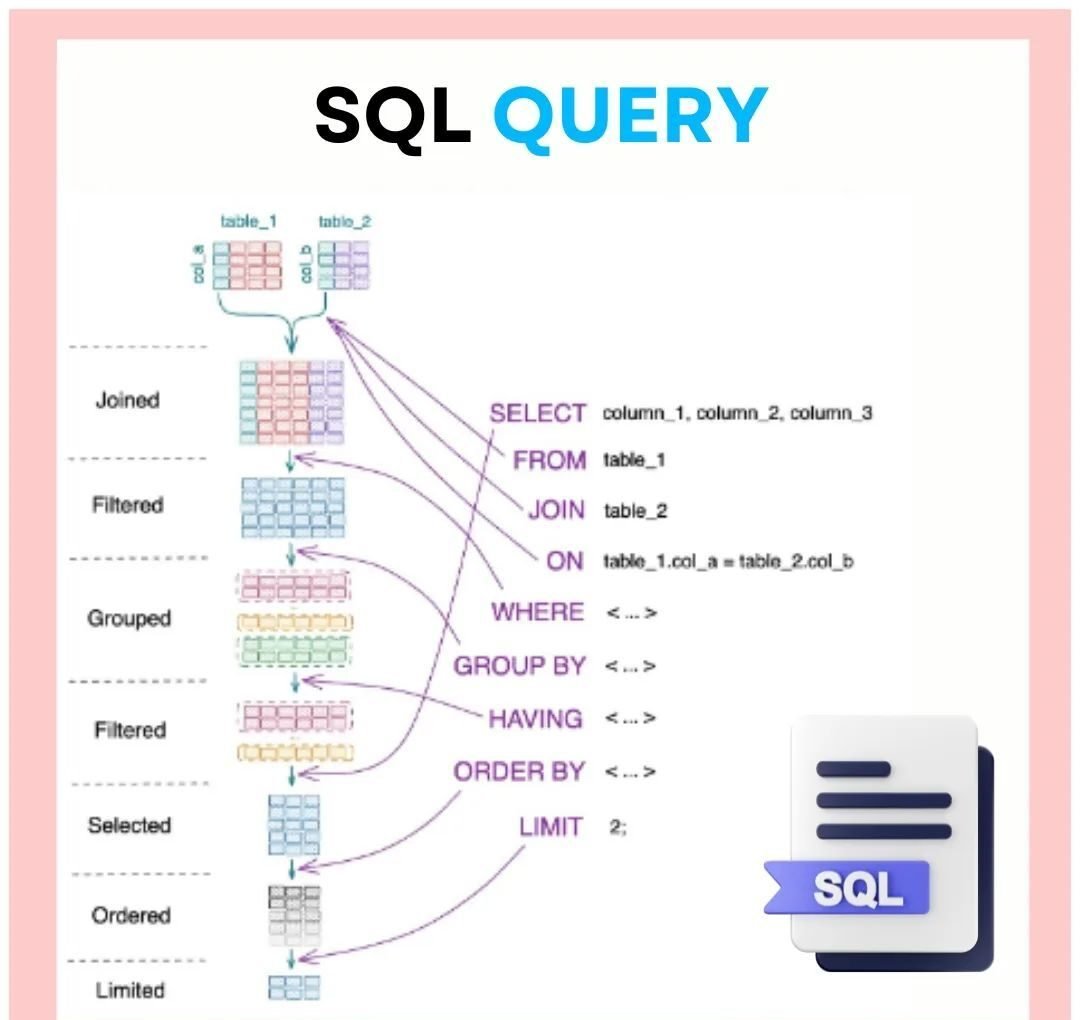
An SQL query follows a logical execution order. Although we write it in one format, the database processes it differently.
Typical query structure:
FROM table_1
JOIN table_2 ON table_1.id = table_2.id
WHERE condition
GROUP BY column
HAVING condition
ORDER BY column
LIMIT 10;
Execution flow:
- FROM – Select tables
- JOIN – Combine related tables
- WHERE – Filter rows
- GROUP BY – Group data
- HAVING – Filter grouped data
- SELECT – Choose columns
- ORDER BY – Sort results
- LIMIT – Restrict number of rows
Therefore, understanding execution order is essential for writing optimized queries.
Types of Databases
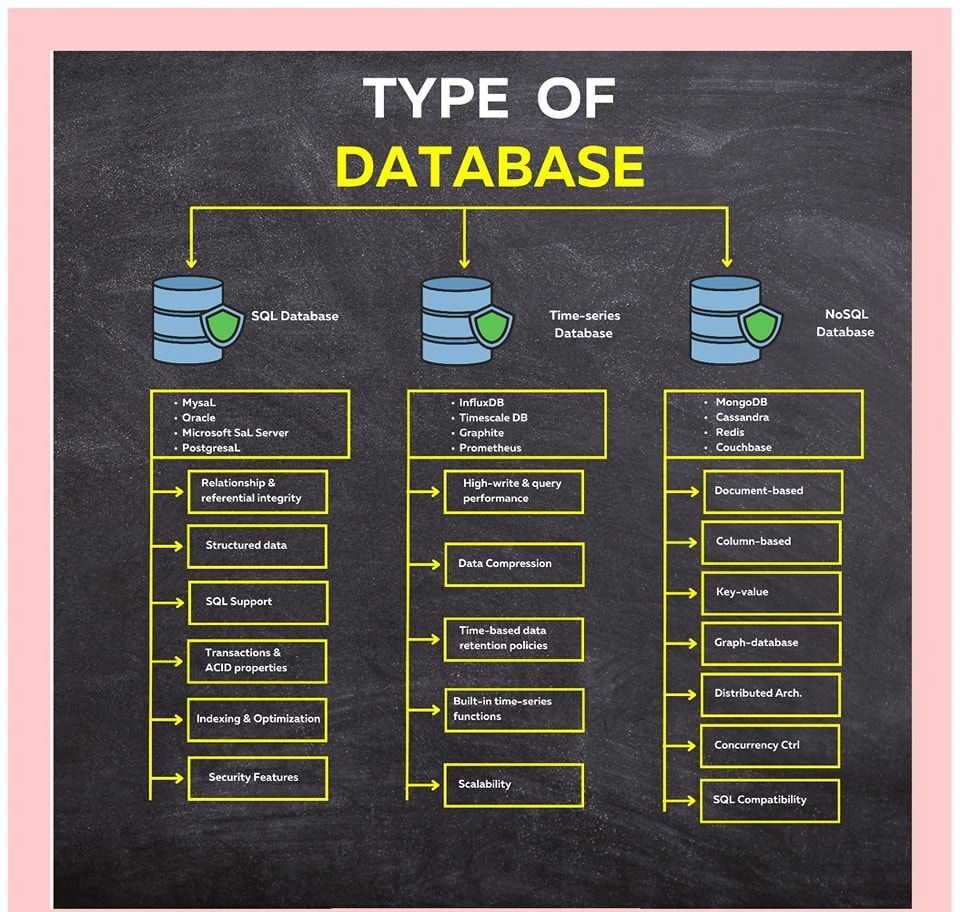
Databases are generally divided into three major categories:
1️⃣ SQL Databases (Relational Databases)
Examples:
- MySQL
- PostgreSQL
- Oracle
- Microsoft SQL Server
Key features:
- Structured data in tables
- Relationships between tables
- ACID transactions
- Strong indexing and optimization
- High data integrity
These databases are ideal for banking systems, enterprise apps, and structured business data.
2️⃣ Time-Series Databases
Examples:
- InfluxDB
- TimescaleDB
- Prometheus
Best suited for:
- Monitoring systems
- IoT data
- Financial market data
- Sensor data
Key advantages:
- High write performance
- Time-based retention policies
- Built-in compression
- Optimized for chronological queries
3️⃣ NoSQL Databases
Examples:
- MongoDB
- Cassandra
- Redis
- Couchbase
Types of NoSQL databases:
- Document-based
- Key-value
- Column-based
- Graph databases
Key benefits:
- Flexible schema
- Distributed architecture
- High scalability
- Fast horizontal scaling
NoSQL is often used in big data systems and high-traffic web applications.
SQL Joins Explained
Joins combine data from multiple tables based on a related column.
Inner Join
Returns only matching records from both tables.
FROM table1
INNER JOIN table2
ON table1.id = table2.id;
Best when you need only common data.
Left Join
Returns all records from the left table and matching records from the right table.
FROM table1
LEFT JOIN table2
ON table1.id = table2.id;
Useful when you want all primary data, even if matches don’t exist.
Right Join
Returns all records from the right table and matching records from the left.
FROM table1
RIGHT JOIN table2
ON table1.id = table2.id;
Less commonly used but helpful in specific reporting scenarios.
Full Join
Returns all records when there is a match in either table.
FROM table1
FULL JOIN table2
ON table1.id = table2.id;
Ideal for complete comparison between datasets.
Cross Join
Returns the Cartesian product of both tables.
FROM table1
CROSS JOIN table2;
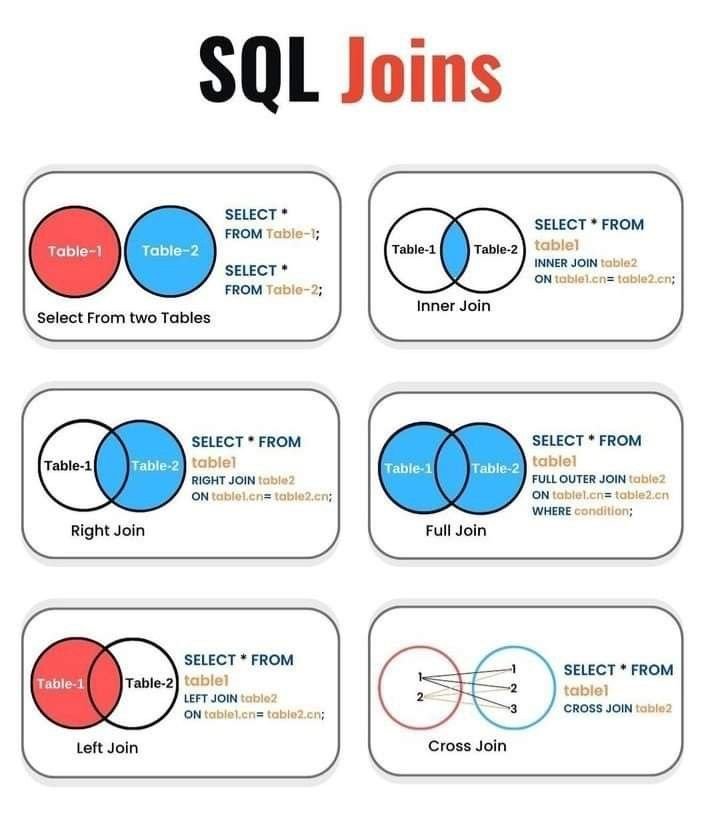
This multiplies rows from both tables.
SQL Keywords You Must Know
Common SQL commands include:
- SELECT
- INSERT
- UPDATE
- DELETE
- CREATE
- DROP
- ALTER
- JOIN
- GROUP BY
- ORDER BY
- LIMIT
Mastering these commands builds a strong SQL foundation.
Top Distributed SQL Databases for Cloud Applications
Distributed SQL databases combine the power of traditional relational databases with horizontal scalability for cloud environments.
Top distributed SQL databases for cloud applications include:
- Google Cloud Spanner – Globally distributed with strong consistency
- CockroachDB – Cloud-native and PostgreSQL-compatible
- Amazon Aurora (Distributed Version) – Managed cloud database with high availability
- YugabyteDB – Open-source distributed SQL engine
- TiDB – Designed for hybrid transactional and analytical workloads
These systems provide:
- Horizontal scaling
- Strong ACID compliance
- Fault tolerance
- Geo-distribution
- High availability
Therefore, they are ideal for SaaS platforms, fintech apps, and global enterprise systems.
SSMS Object Explorer Azure SQL Database Icon (Blue Cylinder)
In SQL Server Management Studio (SSMS), the Azure SQL Database appears as a blue cylinder icon inside Object Explorer.
To view it:
- Open SSMS
- Connect to Azure SQL Server
- Expand the server node
- Expand the “Databases” folder
The blue cylinder icon represents an Azure SQL database instance.
This visual indicator helps differentiate:
- On-prem SQL Server databases
- Azure SQL databases
- Managed instances
SQL Workbench Create Database
To create a database in SQL Workbench, use the following command:
Steps:
- Open SQL Workbench
- Connect to your server
- Open a new query tab
- Execute the CREATE DATABASE statement
After execution, refresh the schema panel to confirm creation.
SQL Vector Database
A SQL vector database stores high-dimensional vector embeddings used in AI applications.
Common use cases:
- Semantic search
- Recommendation systems
- Chatbot retrieval
- Image similarity search
Examples of SQL-compatible vector databases:
- PostgreSQL with pgvector extension
- SingleStore
- AlloyDB with vector support
Vector databases allow similarity searches using cosine similarity or Euclidean distance directly inside SQL queries.
SQL to Search for Column Name in Database
To search for a column name in a database (MySQL example):
FROM information_schema.columns
WHERE column_name LIKE ‘%your_column_name%’;
For SQL Server:
FROM INFORMATION_SCHEMA.COLUMNS
WHERE COLUMN_NAME LIKE ‘%your_column_name%’;
This helps locate column usage across multiple tables.
SQL to List All Tables in a Database
For MySQL:
For SQL Server:
FROM INFORMATION_SCHEMA.TABLES
WHERE TABLE_TYPE = ‘BASE TABLE’;
For PostgreSQL:
FROM pg_catalog.pg_tables
WHERE schemaname = ‘public’;
This query is essential when exploring a new database schema.
SQL to Delete Database
To delete a database:
Important:
- Ensure no active connections exist
- Confirm backups are taken
- Verify correct database name
This action is permanent and cannot be undone.
SQL to Create a Database
Basic syntax:
Advanced example (SQL Server):
ON PRIMARY (
NAME = database_name_data,
FILENAME = ‘C:\data\database_name.mdf’,
SIZE = 10MB,
MAXSIZE = 100MB,
FILEGROWTH = 5MB
);
Creating a database is typically the first step in setting up an application backend.
SQL Synonym for Database
In SQL Server, a synonym is an alias for a database object.
Example:
FOR database_name.schema_name.table_name;
A synonym is not another word for database itself. Instead, it creates an alternate name for objects such as:
- Tables
- Views
- Stored procedures
This simplifies cross-database queries.
SQL Size of Tables in Database
To check table size in MySQL:
table_name AS TableName,
ROUND((data_length + index_length) / 1024 / 1024, 2) AS SizeMB
FROM information_schema.tables
WHERE table_schema = ‘your_database_name’;
For SQL Server:
Monitoring table size helps with:
- Performance tuning
- Storage planning
- Capacity forecasting